
Step-by-step guide
Stop spam calls on Android with the tools already on your phone
Short answer
The Phone app can label suspected spam, filter it out of your notifications, and let you block or report a caller straight from the call log. Menu names differ across Android versions and phone makers, so treat every path as a starting point.
Turn on spam protectionThese are settings on your own phone; we do not look up numbers or store your call history.
- On your device only
- Everything here is a setting on the phone in your hand, not a lookup of anyone.
- Built-in, no app to buy
- The Phone app's spam protection is free and ships with many Android phones.
- Honest limits
- Filtering reduces spam and labels it; it cannot stop every rotating spoofed number.
Turn on Android's spam protection in four steps
If you use the Phone by Google app; on Samsung and other phones the menu names differ.
Advanced scam-call detection needs a recent Android version and the Google apps installed; older phones and other dialers offer a subset.
-
Open the Phone app menu
In the Phone app, tap the three-dot menu, then Settings.
-
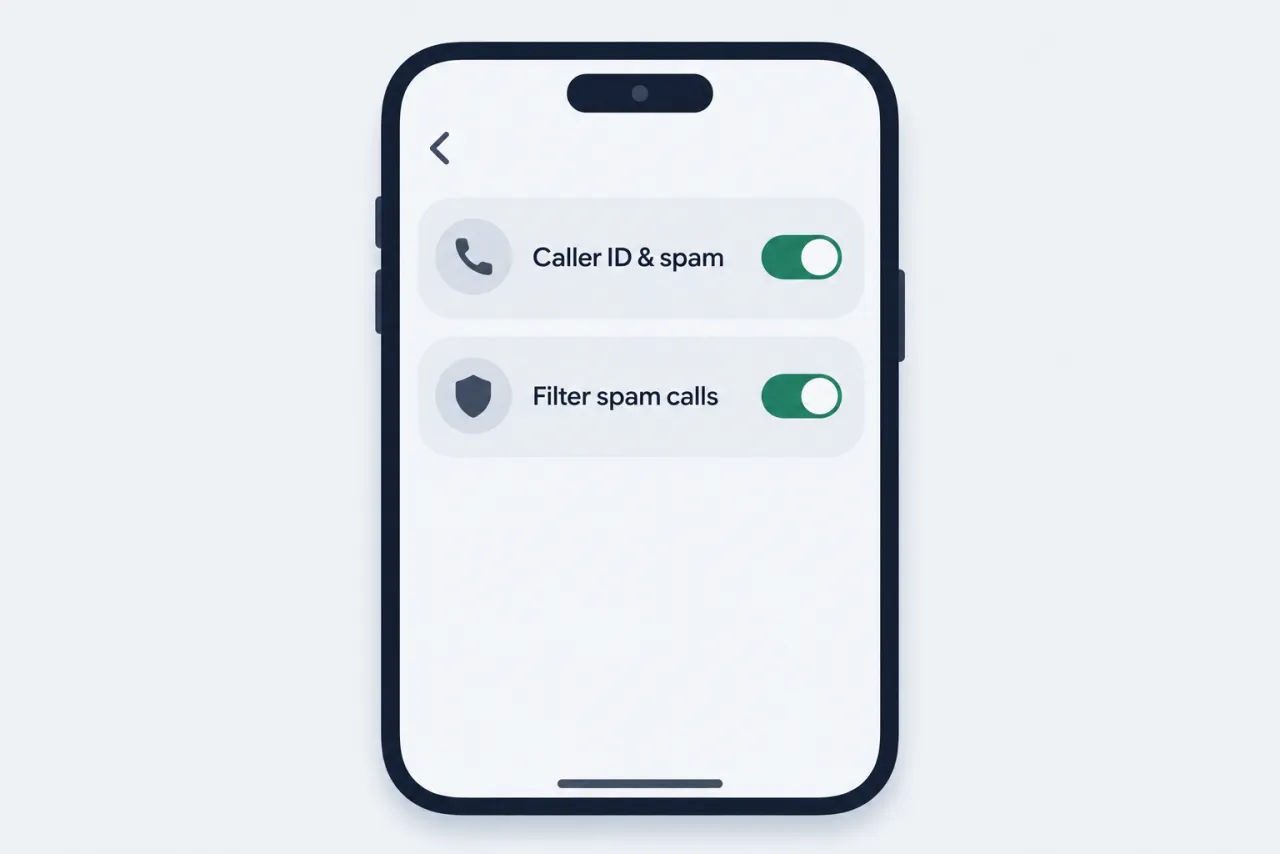
Turn on caller ID and spam
Open Caller ID and spam, then switch on See caller ID and spam; it is usually on already.
-
Filter spam calls
In the same screen, turn on Filter spam calls so suspected spam stops notifying you.
-
Block and report from the log
In Recent calls, tap a bad call, then choose Block or Report spam.
Still getting spam? Add your carrier's network filter →
When the menu on your phone looks different
Android is fragmented, so a path we could quote for one phone may not exist on yours.
-
Samsung phone has no Caller ID and spam menu
Samsung ships its own dialer with different wording.
Instead: Open your dialer's Settings and look for caller ID, spam, or blocked numbers.
-
No Report spam option on your dialer
Not every dialer offers in-app spam reporting, and wording differs by phone maker.
Instead: Report it at donotcall.gov, or reportfraud.ftc.gov if you lost money.
-
No Block option when you tap a call
Some dialers put Block under a details or info screen, or behind a three-dot menu.
Instead: Open the call details or the number's info screen, or add it under Settings, Blocked numbers in your dialer.
-
Filter spam calls toggle is missing
Your phone may use a different dialer, or the feature isn't offered for your app version or region.
Instead: Update the Phone app, check your own dialer's settings for a spam or blocking option, or lean on your carrier's blocking and manual blocks.
What Android's built-in call tools actually do
Four controls that label, filter, block, and screen calls, with honest limits.
-
Spam labels
Suspected spam shows a warning as the caller ID so you can decide before answering.
-
Spam filtering
Filtered calls skip notifications but stay in your call history and voicemail.
-
Block and report
Tap a call in your call log to block the number and, optionally, report it as spam.
-
Call screening
Some phones can have an assistant answer and ask unknown callers why they're calling.
Note: Steps and labels vary by Android version and phone maker; check your dialer's own help for exact wording.
Questions people ask
Does filtering spam calls make me miss real calls?
Filtered calls do not send a missed-call or voicemail notification, but they still appear in your call history and any voicemail is kept, so you can review them. If you often expect calls from unsaved numbers, check the filtered list regularly.
The Phone app marked a real caller as spam. How do I fix it?
Open Recent calls, tap the wrongly labeled call, and choose Not spam so future calls from that number are not marked. You can also unblock it if you blocked it by mistake. Wording differs on Samsung and other dialers.
Can Android tell me who owns an unknown number?
No. Android can show a business name or a suspected-spam label, but it cannot reveal a private person's name or address, and neither can we. Caller ID is spoofable and is not proof of who is calling. Treat unknown numbers with caution and never call back one-ring international numbers.
How do I report a spam call, not just block it?
Reporting in the Phone app helps improve its spam labels. To reach regulators, report an unwanted call at donotcall.gov, or use reportfraud.ftc.gov if you lost money or have details on the caller. Reports support enforcement; they do not instantly stop that caller.